24 KiB

FastApiAdmin 
Modern Full-Stack Rapid Development Platform
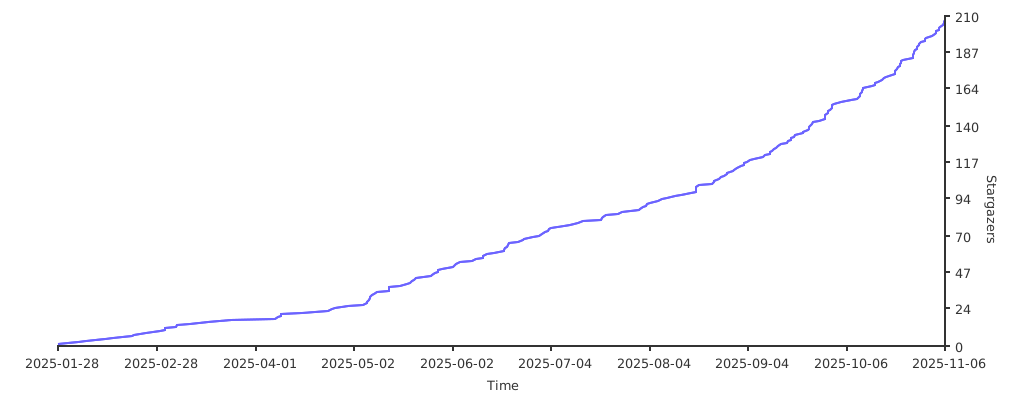
If you like this project, please give it a ⭐️ to show your support!


English | 简体中文
📘 Project Introduction
FastApiAdmin is a completely open-source, highly modular, and technologically advanced modern rapid development platform designed to help developers efficiently build high-quality enterprise-level backend and frontend systems. This project adopts a frontend-backend separation architecture, integrating the Python backend framework FastAPI and the mainstream frontend framework Vue3 to achieve unified development across multiple terminals, providing a one-stop out-of-the-box development experience.
Design Philosophy: With modularity and loose coupling at its core, it pursues rich functional modules, simple and easy-to-use interfaces, detailed development documentation, and convenient maintenance methods. By unifying frameworks and components, it reduces the cost of technology selection, follows development specifications and design patterns, builds a powerful code hierarchical model, and comes with comprehensive local language support. It is specifically tailored for team and enterprise development scenarios.
🔗 Source Repositories
| Platform | Repository |
|---|---|
| GitHub | FastapiAdmin Main | FastDocs Website | FastApp Mobile |
| Gitee | FastapiAdmin Main | FastDocs Website | FastApp Mobile |
🎯 Core Advantages
| Advantage | Description |
|---|---|
| 🔥 Modern Tech Stack | Built with cutting-edge technologies like FastAPI + Vue3 + TypeScript |
| ⚡ High Performance | Leveraging FastAPI's asynchronous features and Redis caching for optimized response speed |
| 🔐 Secure & Reliable | JWT + OAuth2 authentication mechanism with RBAC permission control model |
| 🧱 Modular Design | Highly decoupled system architecture for easy expansion and maintenance |
| 🌐 Full-Stack Support | Integrated solution for Web + Mobile(H5) + Backend |
| 🚀 Rapid Deployment | One-click Docker deployment for quick production rollout |
| 📖 Comprehensive Docs | Detailed documentation and tutorials to reduce learning curve |
📦 Engineering Structure Overview
FastapiAdmin
├─ backend               # Backend project (FastAPI + Python)
├─ frontend              # Web frontend project (Vue3 + Element Plus)
├─ fastapp               # Mobile project (UniApp + Wot Design Uni)
├─ fastdocs              # Documentation project (VitePress)
├─ devops                # Deployment configurations
├─ docker-compose.yaml   # Docker orchestration file
├─ deploy.sh             # One-click deployment script
├─ LICENSE               # Open source license
|─ README.en.md          # English documentation
└─ README.md             # Chinese documentation
🛠️ Technology Stack Overview
| Type | Technology Selection | Description |
|---|---|---|
| Backend Framework | FastAPI / Uvicorn / Pydantic 2.0 / Alembic | Modern, high-performance asynchronous framework with mandatory type constraints and data migration capabilities |
| ORM | SQLAlchemy 2.0 | Powerful ORM library |
| Scheduled Tasks | APScheduler | Easily implement scheduled tasks |
| Authentication | PyJWT | Implement JWT authentication |
| Frontend Framework | Vue3 / Vite5 / Pinia / TypeScript | Rapidly develop Vue3 applications |
| Web UI | ElementPlus | Enterprise-level UI component library |
| Mobile | UniApp / Wot Design Uni | Cross-platform mobile application framework |
| Database | MySQL / MongoDB | Support for relational and document databases |
| Cache | Redis | High-performance cache database |
| Documentation | Swagger / Redoc | Automatically generate API documentation |
| Deployment | Docker / Nginx / Docker Compose | Containerized deployment solution |
📌 Built-in Functional Modules
| Module | Features | Description |
|---|---|---|
| 📊 Dashboard | Workbench, Analysis Page | System overview and data analysis |
| ⚙️ System Management | Users, Roles, Menus, Departments, Positions, Dictionaries, Configurations, Announcements | Core system management functions |
| 👀 Monitoring | Online Users, Server Monitoring, Cache Monitoring | System runtime status monitoring |
| 📋 Task Management | Scheduled Tasks | Asynchronous task scheduling management |
| 📝 Log Management | Operation Logs | User behavior auditing |
| 🧰 Development Tools | Code Generation, Form Builder, API Documentation | Tools to enhance development efficiency |
| 📁 File Management | File Storage | Unified file management |
🍪 Demo Environment
- 🌐 Official Website: https://service.fastapiadmin.com
- 💻 Web Demo: https://service.fastapiadmin.com/web
- 📱 Mobile: https://service.fastapiadmin.com/app
- 👤 Login Account:
adminPassword:123456
🚀 Quick Start
Environment Requirements
| Type | Technology Stack | Version |
|---|---|---|
| Backend | Python | 3.12 ≥ 3.10 |
| Backend | FastAPI | 0.109+ |
| Frontend | Node.js | ≥ 20.0 |
| Frontend | Vue3 | 3.3+ |
| Database | MySQL | 8.0+ |
| Cache | Redis | 7.0+ |
Get the Code
# Clone the repository to your local machine
git clone https://gitee.com/tao__tao/FastapiAdmin.git
# Or
git clone https://github.com/1014TaoTao/FastapiAdmin.git
Backend Setup
# Navigate to the backend directory
cd backend

# Install dependencies
pip3 install -r requirements.txt

# Start the backend service: ensure that MySQL and Redis are running
python main.py run
# Or specify environment
python main.py run --env=dev

# Generate migration files
python main.py revision --env=dev
# Apply migrations
python main.py upgrade --env=dev
Frontend Setup
# Navigate to the frontend directory
cd frontend

# Install dependencies
pnpm install

# Start the development server
pnpm run dev

# Build for production
pnpm run build
Mobile Setup
# Navigate to the mobile directory
cd fastapp

# Install dependencies
pnpm install

# Start the H5 development server
pnpm run dev:h5

# Build for H5 production
pnpm run build:h5
Documentation Setup
# Navigate to the documentation directory
cd fastdocs

# Install dependencies
pnpm install

# Start the documentation development server
pnpm run docs:dev

# Build documentation for production
pnpm run docs:build
Access URLs
- 🏠 Official Website: http://localhost:5180
- 🖥️ Web Interface: http://localhost:5180/web
- 📱 Mobile Interface: http://localhost:5180/app
Default accounts:
- Admin:
admin/123456
🐳 Docker Deployment
# Copy the deployment script to the server and grant execution permissions
chmod +x deploy.sh

# Execute one-click deployment
./deploy.sh

# Common Docker commands
# View running containers
docker compose ps

# View container logs
docker logs -f <container_name>

# Stop services
docker compose down
🔧 Models
| Module | Screenshot |
|---|---|
| Login |  |
| Dashboard |  |
| Analysis |  |
| Menu |  |
| Department |  |
| Position |  |
| Role |  |
| User |  |
| Log |  |
| Config |  |
| OnlineUser |  |
| Server |  |
| Cache |  |
| Task |  |
| Dict |  |
| API Docs |  |
| Theme |  |
| Document |  |
| Lock |  |
| Form |  |
| Generator |  |
| Workflow |  |
| File |  |
| MyApps |  |
| Setting |  |
| AI |  |
Mobile
| Module | Details | Module | Details | Module | Details |
|---|---|---|---|---|---|
| Login |  |
Home |  |
Profile |  |
| Personal |  |
Settings |  |
Workbench |  |
🛠️ Secondary Development Tutorial
Backend Development
The project adopts a plugin-based architecture design, and it is recommended to carry out secondary development in the backend/app/plugin directory. The system will automatically discover and register all routes that meet the specifications, facilitating module management and upgrade maintenance.
Plugin Architecture Features
- Automatic Route Discovery: The system automatically scans all
controller.pyfiles in thebackend/app/plugin/directory - Automatic Route Registration: All routes are automatically registered to the corresponding prefix path (module_xxx -> /xxx)
- Modular Management: Code is organized by functional modules for easy maintenance and extension
- Support for Multi-level Nesting: Support for multi-level nested structures within modules
Plugin Directory Structure
backend/app/plugin/
├── module_application/  # Application module (automatically mapped to /application)
│   └── ai/              # AI submodule
│       ├── controller.py # Controller file
│       ├── model.py      # Data model file
│       ├── schema.py     # Data validation file
│       ├── service.py    # Business logic file
│       └── crud.py       # Data access file
├── module_example/      # Example module (automatically mapped to /example)
│   └── demo/            # Submodule
│       ├── controller.py # Controller file
│       ├── model.py      # Data model file
│       ├── schema.py     # Data validation file
│       ├── service.py    # Business logic file
│       └── crud.py       # Data access file
├── module_generator/    # Code generation module (automatically mapped to /generator)
└── init_app.py          # Plugin initialization file
Automatic Route Registration Mechanism
The system will automatically discover and register all routes that meet the following conditions:
- Controller files must be named
controller.py - Routes are automatically mapped:
module_xxx->/xxx - Support for multiple
APIRouterinstances - Automatic route deduplication
Secondary Development Steps
- Create Plugin Module: Create a new module directory under
backend/app/plugin/, such asmodule_yourfeature - Write Data Model: Define database models in
model.py - Write Data Validation: Define data validation models in
schema.py - Write Data Access Layer: Write database operation logic in
crud.py - Write Business Logic Layer: Write business logic in
service.py - Write Controller: Define routes and handling functions in
controller.py - Automatic Registration: The system automatically scans and registers all routes, no manual configuration required
Controller Example
# backend/app/plugin/module_yourfeature/yourcontroller/controller.py
from fastapi import APIRouter, Depends, Path
from fastapi.responses import JSONResponse

from app.common.response import SuccessResponse
from app.core.router_class import OperationLogRoute
from app.core.dependencies import AuthPermission
from app.api.v1.module_system.auth.schema import AuthSchema
from .service import YourFeatureService

# Create route instance
YourFeatureRouter = APIRouter(
    route_class=OperationLogRoute,
    prefix="/yourcontroller",
    tags=["Your Feature Module"]
)

@YourFeatureRouter.get("/detail/{id}", summary="Get Detail")
async def get_detail(
    id: int = Path(..., description="Feature ID"),
    auth: AuthSchema = Depends(AuthPermission(["module_yourfeature:yourcontroller:detail"]))
) -> JSONResponse:
    """
    Get feature detail

    Parameters:
    - id (int): Feature ID
    - auth (AuthSchema): Authentication information model

    Returns:
    - JSONResponse: JSON response containing feature detail
    """
    result = await YourFeatureService.detail_service(id=id, auth=auth)
    return SuccessResponse(data=result)

@YourFeatureRouter.get("/list", summary="Get List")
async def get_list(
    auth: AuthSchema = Depends(AuthPermission(["module_yourfeature:yourcontroller:list"]))
) -> JSONResponse:
    """
    Get feature list

    Parameters:
    - auth (AuthSchema): Authentication information model

    Returns:
    - JSONResponse: JSON response containing feature list
    """
    result = await YourFeatureService.list_service(auth=auth)
    return SuccessResponse(data=result)
Development Specifications
- Naming Convention: Module names use
module_xxxformat, controller names use camelCase naming - Permission Control: All API interfaces must add permission control decorators
- Log Recording: Use
OperationLogRouteclass to automatically record operation logs - Return Format: Use
SuccessResponseorErrorResponseuniformly for responses - Code Comments: Add detailed docstrings for all API interfaces
Notes
- Plugin module names must start with
module_ - Controller files must be named
controller.py - Routes are automatically mapped to corresponding prefix paths
- No manual route registration required, the system automatically discovers and registers
Frontend Part
- Configure Frontend API: Create corresponding API files in
frontend/src/api/directory - Write Page Components: Create page components in
frontend/src/views/directory - Register Routes: Register routes in
frontend/src/router/index.ts
Mobile Part
- Configure Mobile API: Create corresponding API files in
fastapp/src/api/directory - Write Page Components: Create page components in
fastapp/src/pages/directory - Register Routes: Register routes in
fastapp/src/router/index.ts
Code Generator Usage
The project has a built-in code generator that can automatically generate front-end and back-end code based on database table structures, greatly improving development efficiency.
Generation Steps
- Login System: Login to the system using an administrator account
- Enter Code Generation Module: Click "Code Generation" in the left menu
- Import Table Structure: Select the database table to generate code for
- Configure Generation Parameters: Fill in module name, function name, etc.
- Generate Code: Click the "Generate Code" button
- Download or Write: Choose to download the code package or write directly to the project directory
Generated File Structure
# Backend files
backend/app/plugin/module_yourmodule/
└── yourfeature/
    ├── controller.py # Controller file
    ├── model.py      # Data model file
    ├── schema.py     # Data validation file
    ├── service.py    # Business logic file
    └── crud.py       # Data access file

# Frontend files
frontend/src/
├── api/module_yourmodule/
│   └── yourfeature.ts # API call file
└── views/module_yourmodule/
    └── yourfeature/
        └── index.vue # Page component
Generated Code Example
# Generated controller code example
from fastapi import APIRouter, Depends
from fastapi.responses import JSONResponse

from app.common.response import SuccessResponse
from app.core.router_class import OperationLogRoute
from app.core.dependencies import AuthPermission
from app.api.v1.module_system.auth.schema import AuthSchema
from .service import YourFeatureService
from .schema import (
    YourFeatureCreateSchema,
    YourFeatureUpdateSchema,
    YourFeatureQueryParam
)

YourFeatureRouter = APIRouter(
    route_class=OperationLogRoute,
    prefix="/yourfeature",
    tags=["Your Feature Module"]
)

@YourFeatureRouter.get("/detail/{id}")
async def get_detail(
    id: int,
    auth: AuthSchema = Depends(AuthPermission(["module_yourmodule:yourfeature:detail"]))
) -> JSONResponse:
    result = await YourFeatureService.detail_service(id=id, auth=auth)
    return SuccessResponse(data=result)
Development Tools
- Code Generator: Automatically generate front-end and back-end CRUD code
- API Documentation: Automatically generate Swagger/Redoc API documentation
- Database Migration: Support for Alembic database migration
- Log System: Built-in log recording and query functions
- Monitoring System: Built-in server monitoring and cache monitoring functions
Development Process
- Requirement Analysis: Clarify functional requirements and business logic
- Database Design: Design database table structure
- Code Generation: Use code generator to generate basic code
- Business Logic Development: Perfect business logic and interfaces
- Frontend Development: Develop frontend pages and interactions
- Testing: Conduct unit testing and integration testing
- Deployment: Deploy to production environment
Development Notes
- Permission Control: All API interfaces must add permission control
- Data Validation: All input data must be validated
- Exception Handling: Uniformly handle API exceptions
- Log Recording: Key operations must be logged
- Performance Optimization: Pay attention to API performance optimization, avoid slow queries
- Code Specification: Follow PEP8 and project code specifications
Deployment Instructions
Local Development
# Start backend service
cd backend
python main.py run --env=dev

# Start frontend service
cd frontend
pnpm run dev

# Start mobile service
cd fastapp
pnpm run dev:h5
Docker Deployment
# Execute one-click deployment script
./deploy.sh

# View running status
docker compose ps

# View logs
docker logs -f <container_name>
Technical Support
- Official Documentation: https://service.fastapiadmin.com
- GitHub: https://github.com/1014TaoTao/FastapiAdmin
- Gitee: https://gitee.com/tao__tao/FastapiAdmin
Common Questions
Q: How to add a new functional module?
A: Follow the secondary development steps, create a new module directory under backend/app/plugin/ directory, and write related code.
Q: How to configure the database?
A: Configure database connection information in backend/env/.env.dev or backend/env/.env.prod files.
Q: How to configure Redis?
A: Configure Redis connection information in backend/env/.env.dev or backend/env/.env.prod files.
Q: How to generate database migration files?
A: Use the command python main.py revision --env=dev to generate migration files.
Q: How to apply database migrations?
A: Use the command python main.py upgrade --env=dev to apply migrations.
Q: How to start the development server?
A: Use the command python main.py run --env=dev to start the development server.
Q: How to build the frontend production version?
A: Use the command pnpm run build to build the frontend production version.
Q: How to deploy to production environment?
A: Use the ./deploy.sh script for one-click deployment to production environment.
ℹ️ Help
For more details, please check the Official Documentation
👥 Contributors
🙏 Special Thanks
Thanks to the contributions and support of the following open-source projects:
🎨 Community
| Group QR Code | WeChat Pay QR Code |
|---|---|
 |
 |
❤️ Support the Project
If you like this project, please give it a ⭐️ Star to show your support! Thank you very much!