# FastAPI Best Architecture
[](https://github.com/fastapi-practices/fastapi_best_architecture/blob/master/LICENSE)
[](https://www.python.org/downloads/)
[](https://github.com/astral-sh/ruff)
> [!CAUTION]
> **For 2023-12-22 (announcement)**
>
> The master branch has completed the app architecture refactoring, please pay extra attention to sync fork operations
> to avoid irreparable damage!
> We have kept and locked the original branch (legacy-single-app-pydantic-v2), which you can get in the branch selector
English | [简体中文](./README.zh-CN.md)
FastAPI framework based on the front-end and back-end separation of the middle and back-end solutions, follow
the [pseudo three-tier architecture](#pseudo-three-tier-architecture) design, support for **python3.10** and above
versions
Its purpose is to allow you to use it directly as the infrastructure of your new project, this repository as a template
library open to any person or enterprise can be used for free!
**🔥Continuously updated and maintained🔥**
## Pseudo three-tier architecture
The mvc architecture is a common design pattern in python web, but the three-tier architecture is even more fascinating
In python web development, there is no common standard for the concept of three-tier architecture, so we'll call it a
pseudo three-tier architecture here
But please note that we don't have a traditional multi-app structure (django, springBoot...) If you don't like this
pattern, use templates to transform it to your heart's content!
| workflow | java | fastapi_best_architecture |
|----------------|----------------|---------------------------|
| view | controller | api |
| data transmit | dto | schema |
| business logic | service + impl | service |
| data access | dao / mapper | crud |
| model | model / entity | model |
## Online Demo
You can view some of the preview screenshots
in [fastapi_best_architecture_ui](https://github.com/fastapi-practices/fastapi_best_architecture_ui)
Luckily, we now have a demo site: [FBA UI](https://fba.xwboy.top/)
> username / password: admin / 123456
## Features
- [x] Design with FastAPI PEP 593 Annotated Parameters
- [x] Global asynchronous design with async/await + asgiref
- [x] Follows Restful API specification
- [x] Global SQLAlchemy 2.0 syntax
- [x] Pydantic v1 and v2 (different branches)
- [x] Casbin RBAC access control model
- [x] Role menu RBAC access control model
- [x] Celery asynchronous tasks
- [x] JWT middleware whitelist authentication
- [x] Global customizable time zone time
- [x] Docker / Docker-compose deployment
- [x] Pytest Unit Testing
## Built-in features
1. [x] User management: system user role management, permission assignment
2. [x] Department Management: Configure the system organization (company, department, group...)
3. [x] Menu Management: Configuration of system menus, user menus, button privilege identification
4. [x] Role Management: Assign role menu privileges, assign role routing privileges
5. [x] Dictionary Management: Maintain common fixed data or parameters within the system.
6. [x] Operation Logs: logging and querying of normal and abnormal system operations.
7. [x] Login Authentication: graphical authentication code background authentication login
8. [x] Login Logs: Logging and querying of normal and abnormal user logins
9. [x] Service Monitoring: server hardware device information and status
10. [x] Scheduled tasks: automated tasks, asynchronous tasks, and function invocation are supported
11. [x] Interface Documentation: Automatically generate online interactive API interface documentation.
## Local development
* Python: 3.10+
* Mysql: 8.0+
* Redis: The latest stable version is recommended
* Nodejs: 14.0+
### BackEnd
1. Install dependencies
```shell
pip install -r requirements.txt
```
2. Create a database `fba`, choose utf8mb4 encoding
3. Install and start Redis
4. Create a `.env` file in the `backend/app/` directory
```shell
cd backend/app/
touch .env
```
5. Copy `.env.example` to `.env`
```shell
cp .env.example .env
```
6. Modify the configuration file as needed
7. Database migration [alembic](https://alembic.sqlalchemy.org/en/latest/tutorial.html)
```shell
cd backend/app/
# Generate migration file
alembic revision --autogenerate
# Execute the migration
alembic upgrade head
```
8. Start celery worker and beat
```shell
celery -A tasks worker --loglevel=INFO
# Optional, if you don't need to use the scheduled task
celery -A tasks beat --loglevel=INFO
```
9. Execute the `backend/app/main.py` file to start the service
10. Browser access: http://127.0.0.1:8000/api/v1/docs
---
### Front
Go to [fastapi_best_architecture_ui](https://github.com/fastapi-practices/fastapi_best_architecture_ui) for details
### Docker deploy
> [!WARNING]
> Default port conflict:8000,3306,6379,5672
>
> As a best practice, shut down on-premises services before deployment:mysql,redis,rabbitmq...
1. Go to the directory where the ``docker-compose.yml`` file is located and create the environment variable
file ``.env``
```shell
cd deploy/docker-compose/
cp .env.server ../../backend/app/.env
# This command is optional
cp .env.docker .env
```
2. Modify the configuration file as needed
3. Execute the one-click boot command
```shell
docker-compose up -d --build
```
4. Wait for the command to complete automatically
5. Visit the browser: http://127.0.0.1:8000/api/v1/docs
## Test data
Initialize the test data using the `backend/sql/init_test_data.sql` file
## Development process
(For reference only)
1. Define the database model (model) and remember to perform database migration for each change
2. Define the data validation model (schema)
3. Define routes (router) and views (api)
4. Define the business logic (service)
5. Write database operations (crud)
## Test
Execute unittests via pytest
1. Create the test database `fba_test`, select utf8mb4 encoding
2. Using `backend/sql/create_tables.sql` file to create database tables
3. Initialize the test data using the `backend/sql/init_pytest_data.sql` file
4. Enter the app directory
```shell
cd backend/app/
```
5. Execute the test command
```shell
pytest -vs --disable-warnings
```
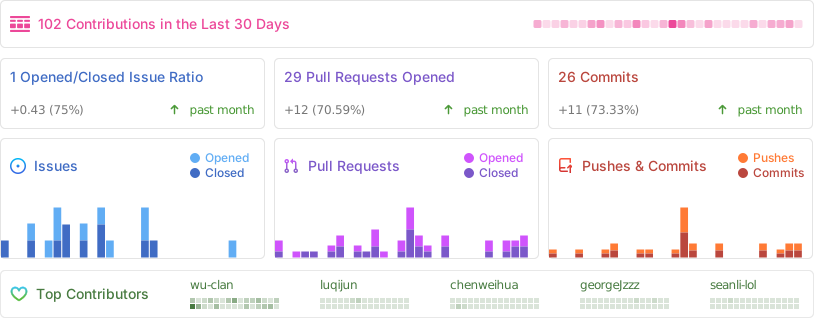
## Status
## Contributors

 ## Special thanks
- [FastAPI](https://fastapi.tiangolo.com/)
- [Pydantic](https://docs.pydantic.dev/latest/)
- [SQLAlchemy](https://docs.sqlalchemy.org/en/20/)
- [Casbin](https://casbin.org/zh/)
- [Ruff](https://beta.ruff.rs/docs/)
- ...
## Interactivity
[WeChat / QQ](https://github.com/wu-clan)
## Sponsor us
If this program has helped you, you can sponsor us with some coffee
beans: [:coffee: Sponsor :coffee:](https://wu-clan.github.io/sponsor/)
## License
This project is licensed under the terms of
the [MIT](https://github.com/fastapi-practices/fastapi_best_architecture/blob/master/LICENSE) license
[](https://starchart.cc/fastapi-practices/fastapi_best_architecture)
## Special thanks
- [FastAPI](https://fastapi.tiangolo.com/)
- [Pydantic](https://docs.pydantic.dev/latest/)
- [SQLAlchemy](https://docs.sqlalchemy.org/en/20/)
- [Casbin](https://casbin.org/zh/)
- [Ruff](https://beta.ruff.rs/docs/)
- ...
## Interactivity
[WeChat / QQ](https://github.com/wu-clan)
## Sponsor us
If this program has helped you, you can sponsor us with some coffee
beans: [:coffee: Sponsor :coffee:](https://wu-clan.github.io/sponsor/)
## License
This project is licensed under the terms of
the [MIT](https://github.com/fastapi-practices/fastapi_best_architecture/blob/master/LICENSE) license
[](https://starchart.cc/fastapi-practices/fastapi_best_architecture)