Fastapi-Vue3-Admin 
A modern, open-source, full-stack integrated rapid development platform for mid - and back - end systems
If you like this project, please give it a ⭐️ to show your support!


English | Chinese
📘 Project Introduction
Fastapi-Vue3-Admin is a completely open-source, highly modular, and technologically advanced modern rapid development platform. Its aim is to help developers efficiently build high-quality enterprise-level mid - and back - end systems. This project adopts a front - end and back - end separation architecture, integrating the Python back - end framework FastAPI and the mainstream front - end framework Vue3 to achieve unified development across multiple terminals, providing a one - stop out - of - the - box development experience.
Original Design Concept: With modularity and loose coupling at its core, it pursues rich functional modules, simple and easy - to - use interfaces, detailed development documentation, and convenient maintenance methods. By unifying frameworks and components, it reduces the cost of technology selection, follows development specifications and design patterns, builds a powerful code hierarchical model, and comes with comprehensive local Chinese support. It is specifically tailored for team and enterprise development scenarios.
📦Engineering Structures
fastapi_vue3_admin
├─ backend        # Backend project
├─ frontend       # Frontend project
├─ fastapp        # Mobile project
├─ fastdocs       # Official Website project
├─ devops         # Deployment project
├─ docker-compose.yaml # Deployment file
├─ start.sh       # One-click deployment script
├─ LICENSE        # License agreement
|─ README.en.md   # English documentation
└─ README.md      # Chinese documentation
✨ Core Highlights
| Feature | Description |
|---|---|
| 🔭 Rapid Development | A completely open-source modern rapid development platform designed to help developers efficiently build high-quality mid- and back-end systems. |
| 🌐 Full-stack Integration | Front-end and back-end separation, integrating Python (FastAPI) + Vue3 for multi-terminal development. |
| 🧱 Modular Design | Highly decoupled system functions, facilitating easy expansion and maintenance. |
| ⚡️ High-performance Asynchronous | Uses the FastAPI asynchronous framework + Redis cache to optimize API response speed. |
| 🔒 Secure Authentication | Supports the JWT OAuth2 authentication mechanism to ensure system security. |
| 📊 Permission Management | The RBAC model enables fine-grained permission control at the menu, button, and data levels. |
| 🚀 Rapid Deployment | Supports one-click deployment with Docker/Docker Compose/Nginx. |
| 📄 Developer-friendly | Provides comprehensive Chinese documentation, a Chinese interface, and a visual toolchain to reduce the learning curve. |
| 🧩 Quick Access | Based on mainstream front-end technology stacks such as Vue3, Vite5, Pinia, and ElementPlus, it's ready to use out of the box. |
🛠️ Technology Stack Overview
| Type | Technology Selection | Description |
|---|---|---|
| Backend Framework | FastAPI / Uvicorn / Pydantic 2.0 / Alembic | A modern, high-performance asynchronous framework with强制类型约束 (mandatory type constraints) and data migration capabilities. |
| ORM | SQLAlchemy 2.0 | A powerful ORM library. |
| Scheduled Tasks | APScheduler | Easily implement scheduled tasks. |
| Permission Authentication | PyJWT | Implement JWT authentication. |
| Frontend Framework | Uni App / Vue3 / Vite5 / Pinia / TypeScript | Rapidly develop Vue3 applications. |
| UI Library | ElementPlus / Wot Design Uni | Quickly develop beautiful UI components. |
| Database | MySQL / MongoDB | Powerful databases. |
| Cache | Redis | A powerful cache database. |
| Documentation | Swagger / Redoc | Automatically generate API documentation. |
| Deployment | Docker / Nginx / Docker Compose | Rapidly deploy projects. |
📌 Built-in Modules
| Module Name | Sub-module Name | Description |
|---|---|---|
| Dashboard | Workbench, Analysis Page | Entry for commonly used functions |
| System Management | Includes sub-modules such as menu, department, position, role, user, log, configuration, announcement, dictionary, and task | Main system functions |
| Monitoring Management | Online users, server monitoring, cache monitoring | System monitoring and management functions |
| Public Management | Interface management, document management | Project interface documentation |
🍪 Demo Environment
- Official website: https://service.fastapiadmin.com
- Web address: https://service.fastapiadmin.com/web
- App address: https://service.fastapiadmin.com/app
- Account:
adminPassword:123456
👷 Installation and Usage
Version Information
| Type | Technology Stack | Version |
|---|---|---|
| Backend | Python | >=3.10 |
| Backend | FastAPI | 0.109 |
| Frontend | Node.js | >= 20.0 (It is recommended to use the latest version.) |
| Frontend | npm | 16.14 |
| Frontend | Vue3 | 3.3 |
| Web UI | ElementPlus | 2.10.4 |
| Mobile | Uni App | 3.0.0 |
| App UI | Wot Design Uni | 1.9.1 |
| Database | MySQL | 8.0 (It is recommended to use the latest version.) |
| Middleware | Redis | 7.0 (It is recommended to use the latest version.) |
Get Code
# Clone the code to your local machine
git clone https://gitee.com/tao__tao/fastapi_vue3_admin.git
或
git clone https://github.com/1014TaoTao/fastapi_vue3_admin.git
Local Backend Start
# Enter the backend project directory
cd backend
# Install dependencies
pip3 install -r requirements.txt
# Start the backend service
python3 main.py run
or
python3 main.py run --env=dev
# Generate migration files
python3 main.py revision "Initial migration" --env=dev (default is dev if not specified)
# Apply migrations
python3 main.py upgrade --env=dev (default is dev if not specified)
Local Frontend Start
# Enter the frontend project directory
cd frontend
# Install dependencies
pnpm install
# Start the frontend service
pnpm run dev
# Build the frontend and generate the `frontend/dist` directory
pnpm run build
Local App H5 Start
# Enter the fastapp project directory
cd fastapp
# Install dependencies
pnpm install
# Start the fastapp service
pnpm run dev:h5
# Build the fastapp and generate the `fastapp/dist/build/h5` directory
pnpm run build:h5
Local Project Website Start
# Enter the fastdocs project directory
cd fastdocs
# Install dependencies
pnpm install
# Run the documentation project
pnpm run docs:dev
# Build the documentation project and generate the `fastdocs/dist` directory
pnpm run docs:build
Local Access Address
- Project official website address: http://localhost:5180
- Web frontend address: http://localhost:5180/web
- App frontend address: http://localhost:5180/app
- Admin account:
adminPassword:123456 - Demo account:
demoPassword:123456
Docker Build
# Copy the script `fastapi_vue3_admin/deploy.sh` to the server and grant execution permissions
chmod +x deploy.sh
# Execute the script
./deploy.sh
# View images:
docker images -a
# View containers:
docker compose ps
# View logs
docker logs -f <Container Name>
# Stop the service
docker compose down
# Delete an image
docker rmi <Image Name>
# Delete a container
docker rm <Container Name>
# Backend configuration file directory
fastapi_vue3_admin/backend/env/.env.prod.py
# Frontend configuration file directory
fastapi_vue3_admin/frontend/vite.config.ts
and
fastapi_vue3_admin/frontend/.env.production
# Deployment file directory
fastapi_vue3_admin/docker-compose.yaml
and
fastapi_vue3_admin/devops/devops/nginx/nginx.conf
🔧 Models
| Module | Screenshot |
|---|---|
| Login |  |
| Dashboard |  |
| Analysis |  |
| Menu |  |
| Department |  |
| Position |  |
| Role |  |
| User |  |
| Log |  |
| Config |  |
| OnlineUser |  |
| Server |  |
| Cache |  |
| Task |  |
| Dict |  |
| API Docs |  |
| Theme |  |
| Document |  |
| Lock |  |
| Form |  |
| Generator |  |
| Workflow |  |
| File |  |
| MyApps |  |
| Setting |  |
| AI |  |
Mobile
| Module | Details | Module | Details | Module | Details |
|---|---|---|---|---|---|
| Login |  |
Home |  |
Profile |  |
| Personal |  |
Settings |  |
Workbench |  |
🛠️ Secondary Development Tutorial
Backend Part
- Write the Entity Class Layer: Create the ORM model for the demo in
backend/app/api/v1/models/demo/example_model.py(corresponding to the entity class layer in Spring Boot). - Write the Data Model Layer: Create the demo data model in
backend/app/api/v1/schemas/demo/example_schema.py(corresponding to the DTO layer in Spring Boot). - Write the Query Parameter Model Layer: Create the query parameter model for the demo in
backend/app/v1/params/demo/example_param.py(corresponding to the DTO layer in Spring Boot). - Write the Persistence Layer: Create the demo data layer in
backend/app/api/v1/cruds/demo/example_crud.py(corresponding to the Mapper or DAO layer in Spring Boot). - Write the Business Layer: Create the demo data layer in
backend/app/api/v1/services/demo/example_service.py(corresponding to the Service layer in Spring Boot). - Write the Interface Layer: Create the demo data layer in
backend/app/api/v1/controllers/demo/example_controller.py(corresponding to the Controller layer in Spring Boot). - Register Backend Routes: Register the demo routes in
backend/app/api/v1/urls/demo_url.py. - Register Routes to the FastAPI Service: Register the routes in
backend/plugin/init_app.py. - Add the Demo Module to the System Initialization Script: Add it in
backend/app/scripts/initialize.py(if necessary, you can configure the demo menu permissions inbackend/app/scripts/data/system_menu.jsonandbackend/app/scripts/data/system_role_menus.jsonor from the frontend page menu). - Add the Demo Module to the Database Migration Script: Add it in
backend/app/alembic/env.py.
Frontend Part
- Configure the Frontend to Access the Backend Interface Address: Configure it in
frontend/src/api/demo/example.ts. - Write the Frontend Page: Write it in
frontend/src/views/demo/example/index.vue.
Mobile Part
- Configure the mobile access address for backend interfaces: Write the code in
fastapp/src/api. - Write mobile pages: Write the code in
fastapp/src/pages.
ℹ️ Help
For more details, please check the Official Documentation
👥 Contributors
🙏 Thanks
Thanks to the contributions and support of the following projects, which have enabled the successful completion of this project:
🎨 Community
| WeChat QR Code | Group QR Code | WeChat Pay QR Code |
|---|---|---|
 |
 |
 |
❤️ Star
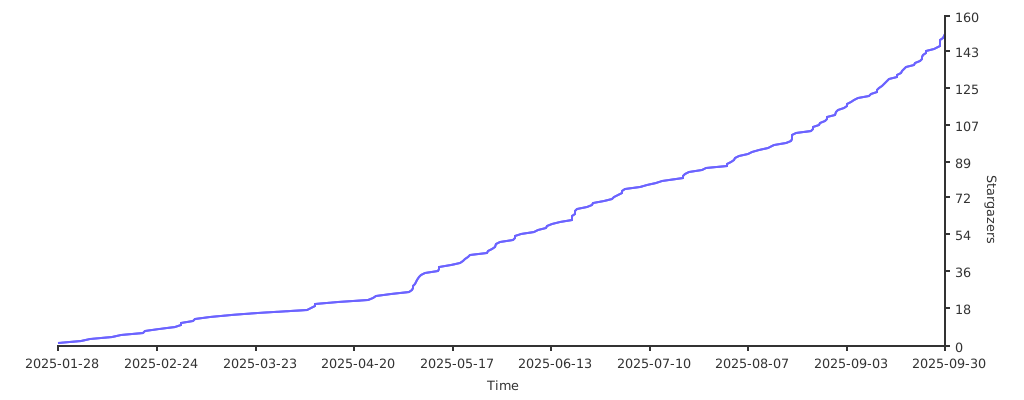
If you like this project, please give it a ⭐️ Star to show your support! Thank you very much!