mirror of
https://github.com/fastapiadmin/FastapiAdmin.git
synced 2026-10-13 20:51:09 +00:00

651 lines
18 KiB
Markdown
651 lines
18 KiB
Markdown
# 国际化
|
||
|
||
本章节将系统化地「拆解」uni-app 项目中的国际化实现流程,从环境搭建到实战应用,手把手教你使用 [vue-i18n](https://vue-i18n.intlify.dev/) 结合vscode插件 [i18n-ally](https://github.com/lokalise/i18n-ally) 与 [Wot UI V2](https://github.com/wot-ui/wot-ui) 构建灵活高效的多语言支持系统,包含了各类平台(H5、小程序、App)的适配要点与优化策略。准备好了吗?Let's go! 不对,应该是「出发吧」...哦等等,这不就是国际化的意义所在吗?😉
|
||
|
||
> 注意:本项目是基于 `Vue3` 和 `WotUI` 的 uni-app cli 框架开发的,如果你使用的是 Vue2,请参考 uni-app [文档](https://uniapp.dcloud.net.cn/tutorial/i18n.html#vue%E7%95%8C%E9%9D%A2%E5%92%8Cjs%E5%86%85%E5%AE%B9%E7%9A%84%E5%9B%BD%E9%99%85%E5%8C%96) 进行相应调整。
|
||
|
||
## 1. 安装和配置vue-i18n
|
||
|
||
### 1.1 安装依赖
|
||
|
||
首先,我们需要安装vue-i18n:
|
||
|
||
```bash
|
||
# 使用npm
|
||
npm install vue-i18n@9.1.9
|
||
|
||
# 或者使用yarn
|
||
yarn add vue-i18n@9.1.9
|
||
|
||
# 或者使用pnpm
|
||
pnpm add vue-i18n@9.1.9
|
||
```
|
||
|
||
> 注意:根据[uni-app官方文档](https://link.juejin.cn?target=https%3A%2F%2Funiapp.dcloud.net.cn%2Ftutorial%2Fi18n.html%23vue%25E7%2595%258C%25E9%259D%25A2%25E5%2592%258Cjs%25E5%2586%2585%25E5%25AE%25B9%25E7%259A%2584%25E5%259B%25BD%25E9%2599%2585%25E5%258C%2596 "https://uniapp.dcloud.net.cn/tutorial/i18n.html#vue%E7%95%8C%E9%9D%A2%E5%92%8Cjs%E5%86%85%E5%AE%B9%E7%9A%84%E5%9B%BD%E9%99%85%E5%8C%96")建议,Vue3项目需要安装vue-i18n的固定版本9.1.9,和uni-app内部使用的vue-i18n保持一致。
|
||
|
||
### 1.2 创建i18n实例
|
||
|
||
在项目中创建一个专门的目录来存放国际化相关的文件,例如`src/locale`:
|
||
|
||
```typescript
|
||
// src/locale/index.ts
|
||
import { createI18n } from 'vue-i18n'
|
||
import zhCN from './zh-CN.json'
|
||
import enUS from './en-US.json'
|
||
import Locale from '@wot-ui/locale/locale'
|
||
import WotEnUS from '@wot-ui/locale/locale/lang/en-US'
|
||
|
||
Locale.add({ 'en-US': WotEnUS })
|
||
|
||
const messages = {
|
||
'zh-CN': {
|
||
...zhCN
|
||
},
|
||
'en-US': {
|
||
...enUS
|
||
}
|
||
}
|
||
|
||
// 创建i18n实例
|
||
const i18n = createI18n({
|
||
locale: uni.getStorageSync('currentLang') || 'zh-CN', // 默认语言
|
||
fallbackLocale: 'zh-CN', // 回退语言
|
||
messages, // 语言包
|
||
legacy: false // 启用Composition API模式
|
||
})
|
||
|
||
// 同步组件库语言
|
||
Locale.use(i18n.global.locale.value)
|
||
uni.setLocale(i18n.global.locale.value)
|
||
|
||
export default i18n
|
||
```
|
||
|
||
### 1.3 在main.ts中注册i18n
|
||
|
||
```typescript
|
||
// src/main.ts
|
||
import { createApp } from 'vue'
|
||
import App from './App.vue'
|
||
import i18n from './locale'
|
||
|
||
const app = createApp(App)
|
||
app.use(i18n)
|
||
app.mount('#app')
|
||
```
|
||
|
||
## 2\. 语言文件的组织结构
|
||
|
||
### 2.1 基本结构
|
||
|
||
语言文件通常以JSON格式存储,每种语言一个文件:
|
||
|
||
```bash
|
||
src/locale/
|
||
├── index.ts # i18n配置和实例
|
||
├── zh-CN.json # 中文语言包
|
||
└── en-US.json # 英文语言包
|
||
```
|
||
|
||
### 2.2 语言文件内容
|
||
|
||
语言文件是键值对的集合,键是唯一标识符,值是对应语言的文本:
|
||
|
||
```json
|
||
// zh-CN.json
|
||
{
|
||
"hello": "你好",
|
||
"welcome": "欢迎使用",
|
||
"button": "按钮"
|
||
}
|
||
|
||
// en-US.json
|
||
{
|
||
"hello": "Hello",
|
||
"welcome": "Welcome to use",
|
||
"button": "Button"
|
||
}
|
||
```
|
||
|
||
### 2.3 嵌套结构
|
||
|
||
对于复杂应用,可以使用嵌套结构组织语言文件:
|
||
|
||
```json
|
||
// zh-CN.json
|
||
{
|
||
"common": {
|
||
"confirm": "确认",
|
||
"cancel": "取消"
|
||
},
|
||
"home": {
|
||
"title": "首页",
|
||
"welcome": "欢迎回来"
|
||
}
|
||
}
|
||
```
|
||
|
||
## 3\. 使用useI18nSync钩子实现多语言切换
|
||
|
||
在项目中,我们实现了一个`useI18nSync`钩子来同步应用和组件库的语言设置:
|
||
|
||
```typescript
|
||
// src/hooks/useI18nSync.ts
|
||
import { computed, onBeforeMount } from 'vue'
|
||
import { Locale } from '@wot-ui/locale/locale'
|
||
import i18n from '../locale'
|
||
|
||
const SUPPORTED_LOCALES = [
|
||
'zh-CN',
|
||
'en-US',
|
||
]
|
||
|
||
function setLocale(locale: string, syncComponentLib: boolean = true) {
|
||
if (!SUPPORTED_LOCALES.includes(locale)) {
|
||
console.warn(`不支持的语言: ${locale},将使用默认语言 zh-CN`)
|
||
locale = 'zh-CN'
|
||
}
|
||
uni.setLocale(locale)
|
||
i18n.global.locale.value = locale
|
||
uni.setStorageSync('currentLang', locale)
|
||
if (syncComponentLib) {
|
||
Locale.use(locale)
|
||
}
|
||
return locale
|
||
}
|
||
|
||
function initLocale(defaultLocale: string, syncComponentLib: boolean) {
|
||
const storedLocale = uni.getStorageSync('currentLang') || defaultLocale
|
||
setLocale(storedLocale, syncComponentLib)
|
||
}
|
||
|
||
interface I18nSyncOptions {
|
||
/** 是否同步组件库语言设置 */
|
||
syncComponentLib?: boolean
|
||
/** 默认语言 */
|
||
defaultLocale?: string
|
||
}
|
||
|
||
/**
|
||
* 国际化同步hook
|
||
* @param options 配置选项
|
||
* @returns 国际化相关方法和状态
|
||
*/
|
||
export function useI18nSync(options?: I18nSyncOptions) {
|
||
const { syncComponentLib = true, defaultLocale = 'zh-CN' } = options || {}
|
||
const currentLang = computed(() => i18n.global.locale.value)
|
||
onBeforeMount(() => {
|
||
initLocale(defaultLocale, syncComponentLib)
|
||
})
|
||
|
||
return {
|
||
currentLang,
|
||
setLocale: (locale: string) => setLocale(locale, syncComponentLib),
|
||
supportedLocales: SUPPORTED_LOCALES
|
||
}
|
||
}
|
||
```
|
||
|
||
### 3.1 在App.vue中初始化语言
|
||
|
||
```vue
|
||
<script setup lang="ts">
|
||
import { useI18nSync } from './hooks/useI18nSync'
|
||
|
||
// 初始化国际化设置
|
||
const { currentLang, setLocale } = useI18nSync()
|
||
</script>
|
||
```
|
||
|
||
### 3.2 实现语言切换功能
|
||
|
||
```vue
|
||
<template>
|
||
<view class="language-switcher">
|
||
<view class="current-lang">{{ $t('dangQianYuYan') }}: {{ currentLang }}</view>
|
||
<wd-button @click="switchLanguage('zh-CN')">中文</wd-button>
|
||
<wd-button @click="switchLanguage('en-US')">English</wd-button>
|
||
</view>
|
||
</template>
|
||
|
||
<script setup lang="ts">
|
||
import { useI18nSync } from '../hooks/useI18nSync'
|
||
|
||
const { currentLang, setLocale } = useI18nSync()
|
||
|
||
function switchLanguage(locale: string) {
|
||
setLocale(locale)
|
||
}
|
||
</script>
|
||
```
|
||
|
||
## 4\. 在组件中使用国际化文本
|
||
|
||
### 4.1 使用Composition API
|
||
|
||
在Vue3的Composition API中使用i18n:
|
||
|
||
```vue
|
||
<template>
|
||
<view class="page">
|
||
<view class="title">{{ t('hello') }}</view>
|
||
<view class="content">{{ t('welcome') }}</view>
|
||
<wd-button>{{ t('button') }}</wd-button>
|
||
</view>
|
||
</template>
|
||
|
||
<script setup lang="ts">
|
||
import { useI18n } from 'vue-i18n'
|
||
|
||
const { t } = useI18n()
|
||
</script>
|
||
```
|
||
|
||
### 4.2 使用模板语法
|
||
|
||
直接在模板中使用$t函数:
|
||
|
||
```vue
|
||
<template>
|
||
<view class="page">
|
||
<view class="title">{{ $t('hello') }}</view>
|
||
<view class="content">{{ $t('welcome') }}</view>
|
||
<wd-button>{{ $t('button') }}</wd-button>
|
||
</view>
|
||
</template>
|
||
```
|
||
|
||
### 4.3 动态计算属性
|
||
|
||
使用computed使内容响应语言变化:
|
||
|
||
```vue
|
||
<script setup lang="ts">
|
||
import { computed } from 'vue'
|
||
import { useI18n } from 'vue-i18n'
|
||
|
||
const { t } = useI18n()
|
||
|
||
// 使用computed使list响应语言变化
|
||
const list = computed(() => [
|
||
{
|
||
id: 'widget',
|
||
name: t('ji-chu'),
|
||
pages: [
|
||
{
|
||
id: 'button',
|
||
name: t('button-an-niu')
|
||
},
|
||
// 其他项...
|
||
]
|
||
}
|
||
])
|
||
</script>
|
||
```
|
||
|
||
## 5\. 处理动态内容的国际化
|
||
|
||
### 5.1 平台限制与解决方案
|
||
|
||
根据uni-app官方文档,由于运行平台限制,**目前在小程序和App端不支持插值方式定义国际化**。这意味着以下方式在小程序和App端无法正常工作:
|
||
|
||
```typescript
|
||
// 这种方式在小程序和App端不支持
|
||
t('hello', { name: '小明' }) // 使用命名参数
|
||
t('hello', ['小明']) // 使用数组参数
|
||
```
|
||
|
||
为了解决这个问题,我们需要使用自定义的插值方法来处理带参数的翻译。
|
||
|
||
### 5.2 带参数的翻译
|
||
|
||
在小程序和App端,我们需要使用特殊的占位符格式和自定义插值方法来处理包含变量的文本:
|
||
|
||
```typescript
|
||
// 在语言文件中定义带占位符的文本
|
||
// zh-CN.json
|
||
{
|
||
"greeting": "你好,{0}!",
|
||
"welcome": "欢迎{0}来到{1}"
|
||
}
|
||
|
||
// 使用时传入参数
|
||
t('greeting', ['小明'])
|
||
// 输出:你好,小明!
|
||
|
||
t('welcome', ['小明', 'wot-ui'])
|
||
// 输出:欢迎小明来到 wot-ui
|
||
```
|
||
|
||
> 注意:我们使用`{0}`, `{1}`这样的数字索引占位符,而不是使用命名参数如`{name}`。这是因为小程序和App端不支持命名参数的插值方式。
|
||
|
||
### 5.3 实现插值工具函数
|
||
|
||
```typescript
|
||
// src/locale/utils.ts
|
||
/**
|
||
* 替换字符串中的占位符
|
||
* @param template 模板字符串,如 "Hello {0}, welcome to {1}"
|
||
* @param values 要替换的值数组
|
||
* @returns 替换后的字符串
|
||
*/
|
||
export function interpolateTemplate(template: string, values: any[]): string {
|
||
return template.replace(/{(\d+)}/g, (_, index) => values[index] ?? '')
|
||
}
|
||
```
|
||
|
||
### 5.4 扩展t函数支持数组参数
|
||
|
||
由于小程序和App端的限制,我们需要扩展vue-i18n的t函数,使其能够处理数组参数并应用我们的插值方法:
|
||
|
||
```typescript
|
||
// src/locale/index.ts
|
||
import { createI18n } from 'vue-i18n'
|
||
import zhCN from './zh-CN.json'
|
||
import enUS from './en-US.json'
|
||
import { interpolateTemplate } from './utils'
|
||
|
||
// 创建i18n实例
|
||
const i18n = createI18n({
|
||
locale: 'zh-CN',
|
||
fallbackLocale: 'zh-CN',
|
||
messages: {
|
||
'zh-CN': zhCN,
|
||
'en-US': enUS
|
||
},
|
||
legacy: false
|
||
})
|
||
|
||
// 扩展t函数,支持数组参数插值
|
||
// 这是解决小程序和App端不支持插值方式的关键步骤
|
||
const originalT = i18n.global.t
|
||
i18n.global.t = ((key: string | number, param1?: any, param2?: any) => {
|
||
const result = originalT(key, param1, param2)
|
||
// 检测是否传入了数组参数,如果是则使用我们的插值方法处理
|
||
if (Array.isArray(param1)) {
|
||
return interpolateTemplate(result, param1)
|
||
}
|
||
return result
|
||
}) as typeof i18n.global.t
|
||
|
||
export default i18n
|
||
```
|
||
|
||
这种扩展方式的优点是:
|
||
|
||
1. 保持了与vue-i18n原有API的兼容性
|
||
2. 在小程序和App端也能使用类似的参数传递方式
|
||
3. 统一了不同平台的国际化使用体验
|
||
|
||
> 需要注意的是我们仅实现了数组参数的插值,如果需要支持更多参数类型,可以进一步扩展。
|
||
|
||
### 5.5 使用示例
|
||
|
||
```vue
|
||
<template>
|
||
<!-- 在模板中使用 -->
|
||
<view>{{ $t('greeting', [username]) }}</view>
|
||
<view>{{ $t('welcome', [username, '@wot-ui/ui']) }}</view>
|
||
</template>
|
||
|
||
<script setup lang="ts">
|
||
import { ref } from 'vue'
|
||
import { useI18n } from 'vue-i18n'
|
||
|
||
const { t } = useI18n()
|
||
const username = ref('小明')
|
||
|
||
// 在JS/TS代码中使用
|
||
const message = t('greeting', [username.value])
|
||
</script>
|
||
```
|
||
|
||
> 注意:这种方法在H5、App和小程序等所有平台上都能正常工作,因为我们使用了自定义的插值方法来处理参数,绕过了小程序和App端的限制。
|
||
|
||
## 6\. 组件库的国际化
|
||
|
||
WotUI组件库本身支持国际化,我们只需要参考[国际化](https://wot-ui.cn/guide/locale.html)文档进行配置即可。
|
||
|
||
### 6.1 同步应用和组件库的语言
|
||
|
||
使用`useI18nSync`钩子可以同步应用和组件库的语言设置:
|
||
|
||
```typescript
|
||
// 同步组件库语言设置
|
||
if (syncComponentLib) {
|
||
Locale.use(locale)
|
||
}
|
||
```
|
||
|
||
## 7\. pages.json的国际化
|
||
|
||
> 注意:建议仔细阅读uni-app[国际化文档](https://link.juejin.cn?target=https%3A%2F%2Funiapp.dcloud.net.cn%2Ftutorial%2Fi18n.html%23vue%25E7%2595%258C%25E9%259D%25A2%25E5%2592%258Cjs%25E5%2586%2585%25E5%25AE%25B9%25E7%259A%2584%25E5%259B%25BD%25E9%2599%2585%25E5%258C%2596 "https://uniapp.dcloud.net.cn/tutorial/i18n.html#vue%E7%95%8C%E9%9D%A2%E5%92%8Cjs%E5%86%85%E5%AE%B9%E7%9A%84%E5%9B%BD%E9%99%85%E5%8C%96")。
|
||
|
||
### 7.1 页面标题国际化
|
||
|
||
在uni-app中,pages.json中的页面标题可以通过占位符实现国际化:
|
||
|
||
```json
|
||
// pages.json
|
||
{
|
||
"pages": [
|
||
{
|
||
"path": "pages/index/index",
|
||
"style": {
|
||
"navigationBarTitleText": "%index-title%"
|
||
}
|
||
}
|
||
]
|
||
}
|
||
```
|
||
|
||
### 7.2 语言文件配置
|
||
|
||
在语言文件中添加对应的翻译:
|
||
|
||
```json
|
||
// zh-CN.json
|
||
{
|
||
"index-title": "首页"
|
||
}
|
||
|
||
// en-US.json
|
||
{
|
||
"index-title": "Home"
|
||
}
|
||
```
|
||
|
||
### 7.3 平台差异处理
|
||
|
||
- **H5平台**:直接支持占位符方式
|
||
- **其他平台**:可以使用自定义Tabbar和Navbar实现
|
||
|
||
> 注意:小程序下不支持这种国际化方案,也可以使用设置tabbar和navigationbar的API来设置文字。或者废弃原生tabbar和navigationbar,使用自定义方式,详情参考[uni-app官方文档](https://link.juejin.cn?target=https%3A%2F%2Funiapp.dcloud.net.cn%2Ftutorial%2Fi18n.html%23pages "https://uniapp.dcloud.net.cn/tutorial/i18n.html#pages")
|
||
|
||
## 8\. i18n-ally插件
|
||
|
||
### 8.1 插件概述
|
||
|
||
i18n-ally是VSCode的一款国际化插件,提供以下核心功能:
|
||
|
||
- 自动检测项目中的硬编码文本
|
||
- 一键提取待翻译内容
|
||
- 多语言文件管理
|
||
- 翻译辅助工具集成
|
||
|
||
### 8.2 安装与配置
|
||
|
||
1. **安装插件**:
|
||
|
||
- 在VSCode扩展市场搜索并安装`i18n-ally`
|
||
- 安装完成后重启VSCode
|
||
2. **基本配置**:
|
||
|
||
- 在项目根目录创建`.vscode/settings.json`文件
|
||
- 添加以下基础配置:
|
||
|
||
```json
|
||
// .vscode/settings.json
|
||
{
|
||
"i18n-ally.sourceLanguage": "zh-CN", // 项目的原始语言(基准语言),通常是开发时使用的默认语言(如 en 或 zh-CN)。
|
||
"i18n-ally.displayLanguage": "zh-CN", // 插件界面中显示的语言(如悬浮提示、侧边栏预览等),方便开发者查看翻译结果。
|
||
"i18n-ally.localesPaths": ["src/locale"],
|
||
"i18n-ally.keystyle": "flat",
|
||
"i18n-ally.sortKeys": true
|
||
}
|
||
```
|
||
|
||

|
||
|
||
### 8.3 核心功能详解
|
||
|
||
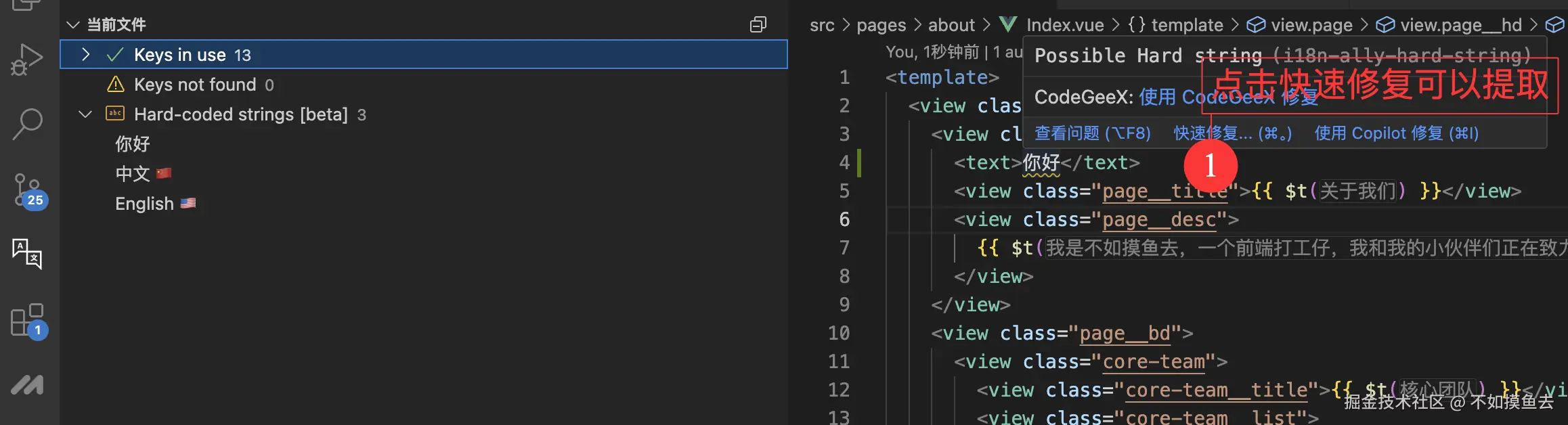
#### 8.3.1 自动检测
|
||
|
||
- 扫描范围:HTML标签内容、Vue模板、JS/TS代码
|
||
- 支持配置检测规则:
|
||
|
||
```json
|
||
"i18n-ally.extract.parsers.html": {
|
||
"attributes": ["text", "title", "alt", "placeholder", "label", "aria-label"],
|
||
"ignoredTags": ["script", "style"],
|
||
"vBind": true,
|
||
"inlineText": true
|
||
}
|
||
```
|
||
|
||
|
||
|
||
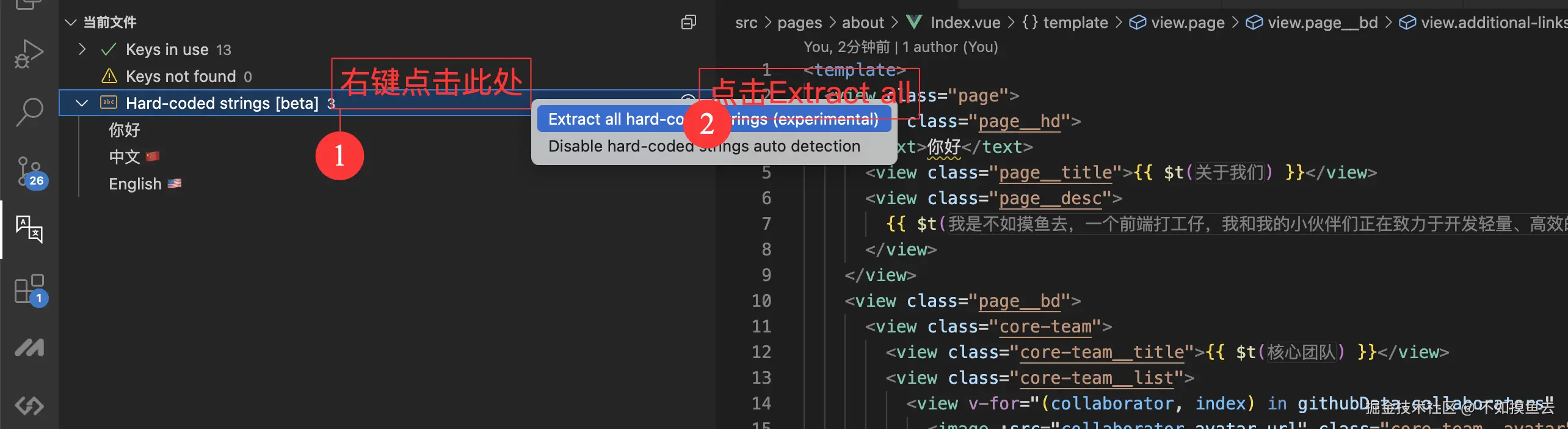
#### 8.3.2 一键提取
|
||
|
||
- 自动生成翻译键
|
||
- 保持语言文件结构一致
|
||
- 支持批量处理
|
||
|
||
|
||
|
||
> 注意:提取的翻译键会自动添加到语言文件中,无需手动添加,但是批量提取的翻译键值会丢失插值参数,例如:`哈哈哈${232}`应当生成为`t('hahaha', [232])`,但实际上生成的是`t('ha-ha-ha-232-0')`,可以选择手动添加插值参数,或者结合[8.4.1 重构模板](#841-重构模板)进行优化。
|
||
|
||
#### 8.3.3 翻译辅助
|
||
|
||
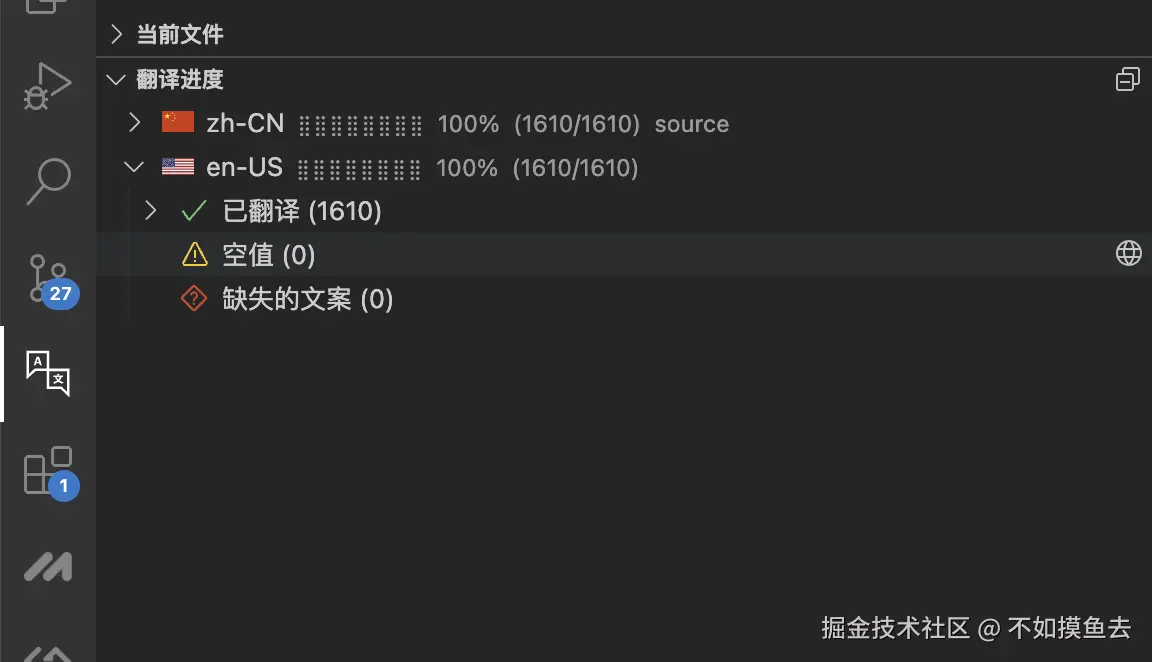
i18n-ally内置翻译API支持,这里我们使用百度翻译API作为示例:
|
||
|
||
1. **注册账号**:访问[百度翻译开放平台](https://link.juejin.cn?target=https%3A%2F%2Ffanyi-api.baidu.com%2F "https://fanyi-api.baidu.com/")注册账号
|
||
2. **创建应用**:获取APP ID和密钥
|
||
3. **配置插件**:
|
||
|
||
```json
|
||
"i18n-ally.translate.engines": ["baidu"],
|
||
"i18n-ally.translate.baidu.appid": "YOUR_APP_ID",
|
||
"i18n-ally.translate.baidu.key": "YOUR_SECRET_KEY"
|
||
```
|
||
|
||
|
||
|
||
### 8.4 高级配置
|
||
|
||
#### 8.4.1 重构模板
|
||
|
||
```json
|
||
"i18n-ally.refactor.templates": [
|
||
{
|
||
"source": "html-inline",
|
||
"template": "{{ $t('{key}'{args}) }}"
|
||
},
|
||
{
|
||
"source": "html-attribute",
|
||
"template": "$t('{key}'{args})"
|
||
}
|
||
]
|
||
```
|
||
|
||
重构模板后,提取的翻译键会自动添加插值参数,例如:`哈哈哈${232}${111}`会生成为携带插值参数的格式`t('hahaha', 232, 111)`,不过`vue-i18n`的`t`方法不支持这种格式,所以我们需要再展t函数,支持可变参数,并将其作为数组参数插值。
|
||
|
||
```typescript
|
||
// src/locale/index.ts
|
||
import { createI18n } from 'vue-i18n'
|
||
import zhCN from './zh-CN.json'
|
||
import enUS from './en-US.json'
|
||
import Locale from '@wot-ui/locale/locale'
|
||
import WotEnUS from '@wot-ui/locale/locale/lang/en-US'
|
||
|
||
Locale.add({ 'en-US': WotEnUS })
|
||
|
||
const messages = {
|
||
'zh-CN': {
|
||
...zhCN
|
||
},
|
||
'en-US': {
|
||
...enUS
|
||
}
|
||
}
|
||
|
||
// 创建i18n实例
|
||
const i18n = createI18n({
|
||
locale: uni.getStorageSync('currentLang') || 'zh-CN',
|
||
fallbackLocale: 'zh-CN',
|
||
messages,
|
||
legacy: false
|
||
})
|
||
|
||
Locale.use(i18n.global.locale.value)
|
||
|
||
uni.setLocale(i18n.global.locale.value)
|
||
|
||
const originalT = i18n.global.t
|
||
i18n.global.t = ((key: string | number, ...args: any[]) => {
|
||
/**
|
||
* 替换字符串中的占位符
|
||
* @param template 模板字符串,如 "Hello {0}, welcome to {1}"
|
||
* @param values 要替换的值数组
|
||
* @returns 替换后的字符串
|
||
*/
|
||
function interpolateTemplate(template: string, values: any[]): string {
|
||
return template.replace(/{(\d+)}/g, (_, index) => values[index] ?? '')
|
||
}
|
||
|
||
// 处理对象参数场景: t(key, {key1: value1, key2: value2})
|
||
if (args.length === 1 && typeof args[0] === 'object' && !Array.isArray(args[0])) {
|
||
const result = originalT(key, ...args)
|
||
return result
|
||
}
|
||
|
||
// 处理数组参数场景: t(key, [arg1, arg2])
|
||
if (args.length === 1 && Array.isArray(args[0])) {
|
||
const result = originalT(key, args[0])
|
||
return interpolateTemplate(result, args[0])
|
||
}
|
||
|
||
// 处理可变参数场景: t(key, arg1, arg2, ...)
|
||
if (args.length > 1 && args.every((arg) => typeof arg !== 'object')) {
|
||
return interpolateTemplate(originalT(key, args), args)
|
||
}
|
||
|
||
// 处理默认场景: t(key) 或 t(key, defaultMessage) 或 t(key, plural) 等
|
||
const result = originalT(key, ...args)
|
||
|
||
return result
|
||
}) as typeof i18n.global.t
|
||
|
||
export default i18n
|
||
```
|
||
|
||
#### 8.4.2 忽略规则
|
||
|
||
```json
|
||
"i18n-ally.extract.ignored": [
|
||
"特定文本",
|
||
"正则表达式",
|
||
]
|
||
```
|
||
|
||
## 总结
|
||
|
||
至此,我们完成了国际化配置,并使用 `i18n-ally` 插件实现了对 Vue 组件的自动提取和翻译。你可以按照本章节在 wot-starter 中集成并实现国际化功能。
|
||
|
||
|
||
## 参考资料
|
||
- [Vue i18n官方文档](https://vue-i18n.intlify.dev/)
|
||
- [uni-app官方文档](https://uniapp.dcloud.net.cn/tutorial/i18n.html#vue%E7%95%8C%E9%9D%A2%E5%92%8Cjs%E5%86%85%E5%AE%B9%E7%9A%84%E5%9B%BD%E9%99%85%E5%8C%96)
|
||
- [wot-ui官方文档](https://wot-ui.cn/)
|
||
- [i18n-ally官方文档](https://github.com/lokalise/i18n-ally)
|