mirror of
https://github.com/fastapiadmin/FastapiAdmin.git
synced 2026-09-20 20:39:55 +00:00

400 lines
18 KiB
Markdown
400 lines
18 KiB
Markdown
<div align="center">
|
||
<p align="center">
|
||
<img src="https://gitee.com/tao__tao/FastDocs/raw/main/src/public/logo.png" width="150" height="150" alt="logo" />
|
||
</p>
|
||
<h1>FastApiAdmin <sup style="background-color: #28a745; color: white; padding: 2px 6px; border-radius: 3px; font-size: 0.4em; vertical-align: super; margin-left: 5px;">v2.0.0</h1>
|
||
<h3>现代化全栈快速开发平台</h3>
|
||
<p>如果你喜欢这个项目,给个 ⭐️ 支持一下吧!</p>
|
||
<p align="center">
|
||
<a href="https://gitee.com/tao__tao/FastapiAdmin.git" target="_blank">
|
||
<img src="https://gitee.com/tao__tao/FastapiAdmin/badge/star.svg?theme=dark" alt="Gitee Stars">
|
||
</a>
|
||
<a href="https://github.com/1014TaoTao/FastapiAdmin.git" target="_blank">
|
||
<img src="https://img.shields.io/github/stars/1014TaoTao/FastapiAdmin?style=social" alt="GitHub Stars">
|
||
</a>
|
||
<a href="https://gitee.com/tao__tao/FastapiAdmin/blob/master/LICENSE" target="_blank">
|
||
<img src="https://img.shields.io/badge/License-MIT-orange" alt="License">
|
||
</a>
|
||
<img src="https://img.shields.io/badge/Python-≥3.10-blue">
|
||
<img src="https://img.shields.io/badge/NodeJS-≥20.0-blue">
|
||
<img src="https://img.shields.io/badge/MySQL-≥8.0-blue">
|
||
<img src="https://img.shields.io/badge/Redis-≥7.0-blue">
|
||
<img src="https://img.shields.io/badge/-HTML5-E34F26?style=flat-square&logo=html5&logoColor=white"/>
|
||
<img src="https://img.shields.io/badge/-CSS3-1572B6?style=flat-square&logo=css3"/>
|
||
<img src="https://img.shields.io/badge/-JavaScript-563D7C?style=flat-square&logo=bootstrap"/>
|
||
</p>
|
||
|
||
简体中文 | [English](./README.en.md)
|
||
|
||
</div>
|
||
|
||
## 📘 项目介绍
|
||
|
||
**FastApiAdmin** 是一套 **完全开源、高度模块化、技术先进的现代化快速开发平台**,旨在帮助开发者高效搭建高质量的企业级中后台系统。该项目采用 **前后端分离架构**,融合 Python 后端框架 `FastAPI` 和前端主流框架 `Vue3` 实现多端统一开发,提供了一站式开箱即用的开发体验。
|
||
|
||
> **设计初心**: 以模块化、松耦合为核心,追求丰富的功能模块、简洁易用的接口、详尽的开发文档和便捷的维护方式。通过统一框架和组件,降低技术选型成本,遵循开发规范和设计模式,构建强大的代码分层模型,搭配完善的本地中文化支持,专为团队和企业开发场景量身定制。
|
||
|
||
## 🔗 源码仓库
|
||
|
||
| 平台 | 仓库地址 |
|
||
|------|----------|
|
||
| GitHub | [FastapiAdmin主工程](https://github.com/1014TaoTao/FastapiAdmin.git) \| [FastDocs官网](https://github.com/1014TaoTao/FastDocs.git) \| [FastApp移动端](https://github.com/1014TaoTao/FastApp.git) |
|
||
| Gitee | [FastapiAdmin主工程](https://gitee.com/tao__tao/FastapiAdmin.git) \| [FastDocs官网](https://gitee.com/tao__tao/FastDocs.git) \| [FastApp移动端](https://gitee.com/tao__tao/FastApp.git) |
|
||
|
||
## 🎯 核心优势
|
||
|
||
| 优势 | 描述 |
|
||
| ---- | ---- |
|
||
| 🔥 **现代化技术栈** | 基于 FastAPI + Vue3 + TypeScript 等前沿技术构建 |
|
||
| ⚡ **高性能异步** | 利用 FastAPI 异步特性和 Redis 缓存优化响应速度 |
|
||
| 🔐 **安全可靠** | JWT + OAuth2 认证机制,RBAC 权限控制模型 |
|
||
| 🧱 **模块化设计** | 高度解耦的系统架构,便于扩展和维护 |
|
||
| 🌐 **全栈支持** | Web端 + 移动端(H5) + 后端一体化解决方案 |
|
||
| 🚀 **快速部署** | Docker 一键部署,支持生产环境快速上线 |
|
||
| 📖 **完善文档** | 详细的开发文档和教程,降低学习成本 |
|
||
|
||
## 📦 工程结构概览
|
||
|
||
```sh
|
||
FastapiAdmin
|
||
├─ backend # 后端工程 (FastAPI + Python)
|
||
├─ frontend # Web前端工程 (Vue3 + Element Plus)
|
||
├─ fastapp # 移动端工程 (UniApp + Wot Design Uni)
|
||
├─ fastdocs # 官网文档工程 (VitePress)
|
||
├─ devops # 部署配置
|
||
├─ docker-compose.yaml # Docker编排文件
|
||
├─ deploy.sh # 一键部署脚本
|
||
├─ LICENSE # 开源协议
|
||
|─ README.en.md # 英文文档
|
||
└─ README.md # 中文文档
|
||
```
|
||
|
||
## 🛠️ 技术栈概览
|
||
|
||
| 类型 | 技术选型 | 描述 |
|
||
|------|----------|------|
|
||
| **后端框架** | FastAPI / Uvicorn / Pydantic 2.0 / Alembic | 现代、高性能的异步框架,强制类型约束,数据迁移 |
|
||
| **ORM** | SQLAlchemy 2.0 | 强大的 ORM 库 |
|
||
| **定时任务** | APScheduler | 轻松实现定时任务 |
|
||
| **权限认证** | PyJWT | 实现 JWT 认证 |
|
||
| **前端框架** | Vue3 / Vite5 / Pinia / TypeScript | 快速开发 Vue3 应用 |
|
||
| **Web UI** | ElementPlus | 企业级 UI 组件库 |
|
||
| **移动端** | UniApp / Wot Design Uni | 跨端移动应用框架 |
|
||
| **数据库** | MySQL / MongoDB | 关系型和文档型数据库支持 |
|
||
| **缓存** | Redis | 高性能缓存数据库 |
|
||
| **文档** | Swagger / Redoc | 自动生成 API 文档 |
|
||
| **部署** | Docker / Nginx / Docker Compose | 容器化部署方案 |
|
||
|
||
## 📌 内置功能模块
|
||
|
||
| 模块 | 功能 | 描述 |
|
||
|------|------|------|
|
||
| 📊 **仪表盘** | 工作台、分析页 | 系统概览和数据分析 |
|
||
| ⚙️ **系统管理** | 用户、角色、菜单、部门、岗位、字典、配置、公告 | 核心系统管理功能 |
|
||
| 👀 **监控管理** | 在线用户、服务器监控、缓存监控 | 系统运行状态监控 |
|
||
| 📋 **任务管理** | 定时任务 | 异步任务调度管理 |
|
||
| 📝 **日志管理** | 操作日志 | 用户行为审计 |
|
||
| 🧰 **开发工具** | 代码生成、表单构建、接口文档 | 提升开发效率的工具 |
|
||
| 📁 **文件管理** | 文件存储 | 统一文件管理 |
|
||
|
||
## 🍪 演示环境
|
||
|
||
- 🌐 官网地址:[https://service.fastapiadmin.com](https://service.fastapiadmin.com)
|
||
- 💻 Web演示:[https://service.fastapiadmin.com/web](https://service.fastapiadmin.com/web)
|
||
- 📱 移动端:[https://service.fastapiadmin.com/app](https://service.fastapiadmin.com/app)
|
||
- 👤 登录账号:`admin` 密码:`123456`
|
||
|
||
## 🚀 快速开始
|
||
|
||
### 环境要求
|
||
|
||
| 类型 | 技术栈 | 版本 |
|
||
|------|--------|------|
|
||
| 后端 | Python | ≥ 3.10 |
|
||
| 后端 | FastAPI | 0.109+ |
|
||
| 前端 | Node.js | ≥ 20.0 |
|
||
| 前端 | Vue3 | 3.3+ |
|
||
| 数据库 | MySQL | 8.0+ |
|
||
| 缓存 | Redis | 7.0+ |
|
||
|
||
### 获取代码
|
||
|
||
```bash
|
||
# 克隆代码到本地
|
||
git clone https://gitee.com/tao__tao/FastapiAdmin.git
|
||
# 或者
|
||
git clone https://github.com/1014TaoTao/FastapiAdmin.git
|
||
```
|
||
|
||
### 后端启动
|
||
|
||
```bash
|
||
# 进入后端工程目录
|
||
cd backend
|
||
|
||
# 安装依赖
|
||
pip3 install -r requirements.txt
|
||
|
||
# 启动后端服务
|
||
python3 main.py run
|
||
# 或指定环境
|
||
python3 main.py run --env=dev
|
||
|
||
# 数据库迁移(首次运行)
|
||
# 生成迁移文件
|
||
python3 main.py revision "初始化迁移" --env=dev
|
||
# 应用迁移
|
||
python3 main.py upgrade --env=dev
|
||
```
|
||
|
||
### 前端启动
|
||
|
||
```bash
|
||
# 进入前端工程目录
|
||
cd frontend
|
||
|
||
# 安装依赖
|
||
pnpm install
|
||
|
||
# 启动开发服务器
|
||
pnpm run dev
|
||
|
||
# 构建生产版本
|
||
pnpm run build
|
||
```
|
||
|
||
### 移动端启动
|
||
|
||
```bash
|
||
# 进入移动端工程目录
|
||
cd fastapp
|
||
|
||
# 安装依赖
|
||
pnpm install
|
||
|
||
# 启动H5开发服务器
|
||
pnpm run dev:h5
|
||
|
||
# 构建H5生产版本
|
||
pnpm run build:h5
|
||
```
|
||
|
||
### 文档启动
|
||
|
||
```bash
|
||
# 进入文档工程目录
|
||
cd fastdocs
|
||
|
||
# 安装依赖
|
||
pnpm install
|
||
|
||
# 启动文档开发服务器
|
||
pnpm run docs:dev
|
||
|
||
# 构建文档生产版本
|
||
pnpm run docs:build
|
||
```
|
||
|
||
### 访问地址
|
||
|
||
- 🏠 项目官网:[http://localhost:5180](http://localhost:5180)
|
||
- 🖥️ Web端:[http://localhost:5180/web](http://localhost:5180/web)
|
||
- 📱 移动端:[http://localhost:5180/app](http://localhost:5180/app)
|
||
|
||
默认账号:
|
||
- 管理员:`admin` / `123456`
|
||
|
||
## 🐳 Docker 部署
|
||
|
||
```bash
|
||
# 复制部署脚本到服务器并赋予执行权限
|
||
chmod +x deploy.sh
|
||
|
||
# 执行一键部署
|
||
./deploy.sh
|
||
|
||
# 常用 Docker 命令
|
||
# 查看运行中的容器
|
||
docker compose ps
|
||
|
||
# 查看容器日志
|
||
docker logs -f <容器名>
|
||
|
||
# 停止服务
|
||
docker compose down
|
||
```
|
||
|
||
## 🔧 模块展示
|
||
|
||
### web 端
|
||
|
||
| 模块名 <div style="width:60px"/> | 截图 |
|
||
| ----- | --- |
|
||
| 登录 |  |
|
||
| 仪表盘 |  |
|
||
| 分析页 |  |
|
||
| 菜单管理 |  |
|
||
| 部门管理 |  |
|
||
| 岗位管理 |  |
|
||
| 角色管理 |  |
|
||
| 用户管理 |  |
|
||
| 日志管理 |  |
|
||
| 配置管理 |  |
|
||
| 在线用户 |  |
|
||
| 服务器监控 |  |
|
||
| 缓存监控 |  |
|
||
| 任务管理 |  |
|
||
| 字典管理 |  |
|
||
| 接口管理 |  |
|
||
| 系统主题 |  |
|
||
| 在线文档 |  |
|
||
| 系统锁屏 |  |
|
||
| 表单构建 |  |
|
||
| 代码生成 |  |
|
||
| 流程管理 |  |
|
||
| 文件管理 |  |
|
||
| 我的应用 |  |
|
||
| 配置中心 |  |
|
||
| 智能助手 |  |
|
||
|
||
### 移动端
|
||
|
||
| 模块 <div style="width:60px"/> | 详情 | 模块 <div style="width:60px"/> | 详情 | 模块 <div style="width:60px"/> | 详情 |
|
||
|----------|------|----------|------|----------|------|
|
||
| 登录 |  | 首页 |  | 我的 |  |
|
||
| 个人 |  | 设置 |  | 工作台 |  |
|
||
|
||
## 🛠️ 二开教程
|
||
|
||
### 后端开发
|
||
|
||
1. **编写实体类层**:在 `backend/app/api/v1/module_generator/demo/model.py` 中创建 example 的 ORM 模型(对应 Spring Boot 中的实体类层)
|
||
2. **编写数据模型层**:在 `backend/app/api/v1/module_generator/demo/schema.py` 中创建 example 数据模型(对应 Spring Boot 中的 DTO 层)
|
||
3. **编写查询参数模型层**:在 `backend/app/api/v1/module_generator/demo/param.py` 中创建 example 的查询参数模型(对应 Spring Boot 中的 DTO 层)
|
||
4. **编写持久化层**:在 `backend/app/api/v1/cruds/module_generator/crud.py` 中创建 example 数据层(对应 Spring Boot 中的 Mapper 或 DAO 层)
|
||
5. **编写业务层**:在 `backend/app/api/v1/services/module_generator/service.py` 中创建 example 数据层(对应 Spring Boot 中的 Service 层)
|
||
6. **编写接口层**:在 `backend/app/api/v1/controllers/module_generator/controller.py` 中创建 example 数据层(对应 Spring Boot 中的 Controller 层)
|
||
7. **将 demo 模块添加至系统初始化脚本**:在 `backend/app/scripts/initialize.py` 中添加(如果需要可以把 demo 的菜单权限,配置到 `backend/app/scripts/data/system_menu.json` 和 `backend/app/scripts/data/system_role_menus.json` 或从前端页面菜单中新增)
|
||
8. **将 demo 模块添加至数据库迁移脚本中**:在 `backend/app/alembic/env.py` 中添加
|
||
|
||
### 代码生成教程
|
||
|
||
代码生成模块是本项目的核心功能之一,可以帮助开发者快速生成完整的 CRUD 代码,大幅提升开发效率。该模块基于 Jinja2 模板引擎,可生成前后端一体化的完整功能模块。
|
||
|
||
#### 代码生成流程
|
||
|
||
1. **创建或导入数据表**:
|
||
- 方式一:通过"创建表"功能直接在系统中创建新表
|
||
- 方式二:通过"导入"功能将现有数据库表导入到代码生成器中
|
||
|
||
2. **配置生成参数**:
|
||
- 基础配置:
|
||
- 表名称、表描述、实体类名称
|
||
- 生成配置:
|
||
- 生成包路径(package_name):如 `student`
|
||
- 生成模块名(module_name):如 `student`
|
||
- 生成业务名(business_name):如 `student`
|
||
- 生成功能名(function_name):如 `学生管理`
|
||
- 生成代码方式:zip压缩包下载 或 项目目录写入
|
||
- 上级菜单:选择生成功能所属的菜单分类
|
||
|
||
3. **字段配置**:
|
||
- 配置每个字段的:
|
||
- 字段列类型、Python类型、Python字段名
|
||
- 是否为主键、是否自增、是否必填
|
||
- 是否为插入字段、编辑字段、列表字段、查询字段
|
||
- 查询方式(等于、不等于、大于、小于、范围)
|
||
- 显示类型(文本框、文本域、下选框、复选框、单选框、日期控件)
|
||
- 字典类型(用于下拉框数据源)
|
||
|
||
4. **代码预览**:
|
||
- 预览将要生成的代码内容
|
||
- 支持预览后端(Python)、前端(Vue/TS)、数据库(SQL)代码
|
||
- 可按类型筛选预览内容
|
||
|
||
5. **生成代码**:
|
||
- 点击"下载代码"生成并下载zip压缩包
|
||
- 点击"写入本地"直接写入到项目目录中
|
||
|
||
#### 生成的文件结构
|
||
|
||
代码生成器会生成完整的前后端代码结构:
|
||
|
||
**后端文件**:
|
||
- 控制器层:`backend/app/api/v1/module_{module_name}/{business_name}/controller.py`
|
||
- 服务层:`backend/app/api/v1/module_{module_name}/{business_name}/service.py`
|
||
- 数据访问层:`backend/app/api/v1/module_{module_name}/{business_name}/crud.py`
|
||
- 数据模型层:`backend/app/api/v1/module_{module_name}/{business_name}/model.py`
|
||
- 数据模式层:`backend/app/api/v1/module_{module_name}/{business_name}/schema.py`
|
||
- 查询参数层:`backend/app/api/v1/module_{module_name}/{business_name}/param.py`
|
||
|
||
**前端文件**:
|
||
- API接口文件:`frontend/src/api/module_{module_name}/{business_name}.ts`
|
||
- 页面组件文件:`frontend/src/views/module_{module_name}/{business_name}/index.vue`
|
||
|
||
**数据库文件**:
|
||
- 菜单SQL文件:`backend/sql/module_{module_name}/{business_name}_menu.sql`
|
||
|
||
#### 使用示例
|
||
|
||
1. 在数据库中创建新表,如 `sys_student`
|
||
2. 登录系统,进入**代码生成**模块
|
||
3. 点击"导入",选择 `sys_student` 表
|
||
4. 配置生成参数:
|
||
- 生成包路径:`student`
|
||
- 生成模块名:`student`
|
||
- 生成业务名:`student`
|
||
- 生成功能名:`学生管理`
|
||
- 上级菜单:系统管理
|
||
5. 配置字段属性(如设置哪些字段需要显示、查询、编辑等)
|
||
6. 点击"预览代码"查看生成的代码
|
||
7. 点击"下载代码"或"写入本地"生成完整功能模块
|
||
8. 重启服务,新功能模块即可使用
|
||
|
||
### 前端部分
|
||
|
||
1. **前端接入后端接口地址**:在 `frontend/src/api/demo/example.ts` 中配置
|
||
2. **编写前端页面**:在 `frontend/src/views/demo/example/index.vue` 中编写
|
||
|
||
### 移动端部分
|
||
|
||
1. **移动端接入后端接口地址**:在 `fastapp/src/api` 中编写
|
||
2. **编写移动端页面**:在 `fastapp/src/pages` 中编写
|
||
|
||
## ℹ️ 帮助
|
||
|
||
更多详情请查看 [官方文档](https://service.fastapiadmin.com)
|
||
|
||
## 👥 贡献者
|
||
|
||
<a href="https://github.com/1014TaoTao/FastapiAdmin/graphs/contributors">
|
||
<img src="https://contrib.rocks/image?repo=1014TaoTao/FastapiAdmin"/>
|
||
</a>
|
||
|
||
## 🙏 特别鸣谢
|
||
|
||
感谢以下开源项目的贡献和支持:
|
||
|
||
- [FastAPI](https://fastapi.tiangolo.com/)
|
||
- [Pydantic](https://docs.pydantic.dev/)
|
||
- [SQLAlchemy](https://www.sqlalchemy.org/)
|
||
- [APScheduler](https://github.com/agronholm/apscheduler)
|
||
- [Vue3](https://cn.vuejs.org/)
|
||
- [TypeScript](https://www.typescriptlang.org/)
|
||
- [Vite](https://github.com/vitejs/vite)
|
||
- [Element Plus](https://element-plus.org/)
|
||
- [UniApp](https://uniapp.dcloud.net.cn/)
|
||
- [Wot-Design-UI](https://wot-ui.cn/)
|
||
|
||
## 🎨 社区交流
|
||
|
||
| 微信二维码 | 群组二维码 | 微信支付二维码 |
|
||
| --- | --- | --- |
|
||
|  |  |  |
|
||
|
||
## ❤️ 支持项目
|
||
|
||
如果你喜欢这个项目,请给我一个 ⭐️ Star 支持一下吧!非常感谢!
|
||
|
||
[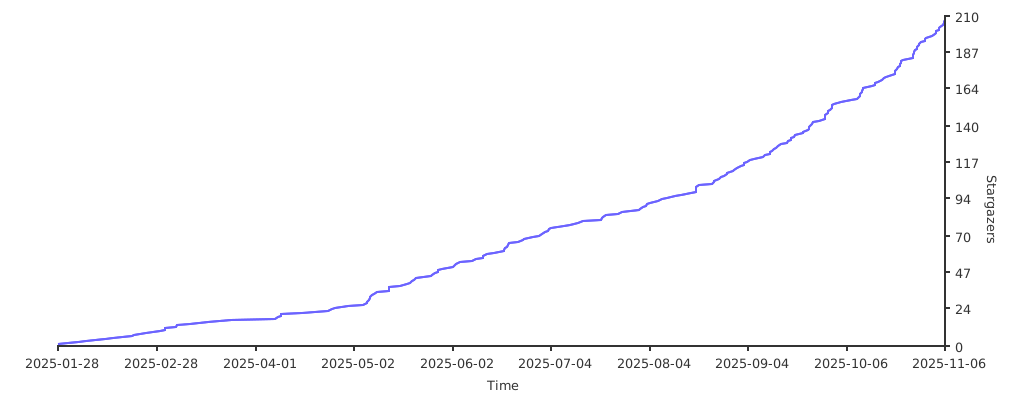](https://starchart.cc/1014TaoTao/FastapiAdmin)
|